How to Play Find Me
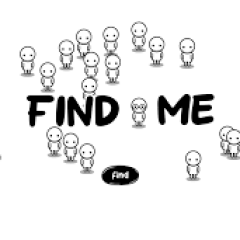
To start Find Me, press the "Find" button. After that, the game will ask you to look for a character with different features. The special character may have upturned eyebrows, a mask, glasses, a tuft of hair, or another small detail that makes them different from the others.
Your goal is to find that character as quickly as possible. Once you see the correct character, click on them before they escape. This is where the game becomes more difficult. The character does not always stay still. They may run, hide, or move around the screen, so you need to be fast and careful.
The best way to play is to scan the screen from left to right or from top to bottom. Do not click randomly, because you may waste time. Look for small differences in the face, hair, eyes, or accessories. When you are sure, click quickly. If you enjoy simple games that test your clicking speed, you may also like Capybara Clicker, a fun clicker game that is easy to play and relaxing.
How to Control the Game
Use the left mouse button to click on the special character. If you are playing on a phone or tablet, simply tap the character on the screen.
Main Difficulties in Find Me
- One of the greatest difficulties in Find Me is that the characters look very similar. The special character may only have one small difference, such as a different eyebrow shape, glasses, a mask, or a small hair detail. If you do not pay close attention, you may miss them.
- Another challenge is movement. The hiding character does not wait for you. They move continuously and may use evasive actions to avoid being caught. This means you need to find them and click quickly at the same time.
- The game also has a time limit. Each level gives you only a certain amount of time to complete the task. If you cannot find the special character before the timer ends, you lose the game. This makes every second important.